Start a New Project


3DQuickForm support multiple projects and you can compare the results easily.
To start a new project:
|
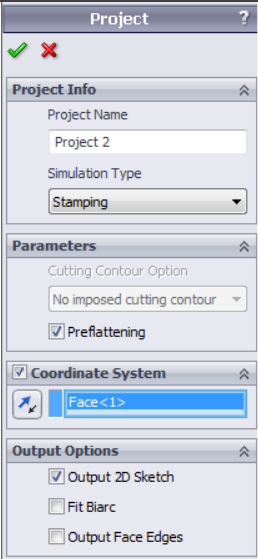
Project Properties Manager Project Name – Input project name Simulation Type – Stamping & Flanging Parameters Preflattening – Turn ON if the part is having undercut area Coordinate System – Punch direction can be defined by coordinate system; Refere nce plane or planar face Output Options Output 2D Sketch – Turn OFF for Flanging and Initial blank simulation have 3D output. Check this box to get a 2D sketch. Fit Biarc – Fit 2D output by line or arc based on the tolerance. Output Face Edges – Face edges will be mapped to the result sketch. .
|